So this week I had the opportunity to play a bit with Animoto. After using Animoto -which is SUPER easy to use - I think I would like to have something like Windows Movie Maker that Aaron was showing us in the Google Hangout. The Animoto was fun for doing a quick 30 second video clip, as everything is straight forward, but there isn't too much that you can edit/manipulate. Maybe if I paid for the upgrade instead of using the 30 second free option, there may be more options... but I am sticking with the free account for now.
My daughter is a violin player, so I talked to her tonight about video taping her for my course. She was open to it, so I may try playing around with that option and try to post a short video clip to YouTube, rather than doing another picture-video presentation. I haven't posted anything to YouTube before, so I'll have to see if I can figure that one out. Hey Aaron...do you have a screenr video for that? :)
Tuesday, 29 January 2013

Saturday, 26 January 2013


The lights are "flickr" ing in my head!
Learning about flickr...
This week’s Blog is very much a point form, note taking
format as I jumped back and forth between experimenting with flickr, and
writing for my blog. My apologies if it seems very disjointed!!
I have only uploaded photos to Facebook before, so I am not
completely new to uploading, but Flickr is new for me. I was a little hesitant
to sign up for ANOTHER account (yahoo) as it seems there is an account and
password for everything!!
So once I was signed in, adding photos was relatively easy,
and I think I figured out how to put captions under them. I am surprised,
however, how long it takes to upload only 5 photos. I did have to chuckle at
the little message on the screen, “Hold on there, tiger” as I was waiting for
the pictures to upload.
Okay, I think my first attempt was a fail, as it is taking
WAY too long I think.
So I tried dragging photos from a different file, and this
time uploaded only 2 photos to see if it would work. Voila!
I have to admit, going through all the Privacy &
Permissions Settings, and Personal Information settings is overwhelming to me.
I have a hard time figuring out what it all means, and am usually uncertain if
I have set my privacy settings the way I would like them to be.
I am wondering if every time, before I upload photos, if I
have to modify my “owner settings” or if it is taken care of in my other
Privacy and Permission settings?
Okay, so uploading 2 photos was almost instant. So now I am
trying to upload 8, and it just isn’t working again. Maybe there is something I
am missing. I have had enough for tonight!!…
So back at it today. I read that we had to provide a link to
our flickr, so decided to delete the photos that I didn’t want to be public. I
still haven’t quite figured out how to upload multiple photos at a time. I
tried one at a time, but there must be a quicker way.
I think I may have figured out how to create a set, and add
photos to the set. I like this because it is a way to organize photos into a particular
theme.
I found that by following along in the text by Berger and
Trexler (2010) was helpful. I usually like to just play around and try to
figure things out for myself through trial and error, but it was nice to have
some simple instructions on how to get things started.
Reading on in the text, I also liked that I could create
different groups. I decided to create a private group that I could invite only
family and friends to view the photos. I guess I didn’t have to delete the
photos from earlier! Oh well! I thought I would try a “Highlights of 2013”
group, so I will see how that goes throughout this year!
When it comes to using flickr in schools, I appreciate that
there can be privacy settings. I was concerned about the photos becoming
public, and anyone having access to them. It looks like there are a few
different group settings, so that would be helpful for deciding how to organize
who will see the photos/video and who can’t.
While reading through the Richardson text, I was amazed at
the description of how to incorporate flickr with Google Maps and Google Earth
(Richardson, 2010, p.106). This is something that I found very interesting, and
would like to learn more about! Students could post pictures of various places,
and be able to view other photos that have been taken near that place. I do
wonder, however, what the privacy settings would be for that? Being able to add
these photos to their own Blogs is another component that students could learn,
and would also be helpful for checking/learning about citations and credits.
Another great idea in the Richardson text is the “photo
field trip” (Richardson, 2010, p.108). There are so many fascinating photos of
different places in the world that students could do research pertaining to the
photos of the places they find, and it makes it more personal and meaningful
for them. Many great ideas, but I do realize that learning all the facets of
privacy can be a bit overwhelming for me, as I discovered early on while
learning about flickr.
Well, the Berger and Trexler text says that I can embed my
photos from flickr right in my blog, so I will give that a try! If it doesn't work, my username is nsauer.
Thursday, 24 January 2013
Socially Networked Classroom - discussion post
I guess I forgot to post my discussion response from Vista over to my blog, so here it is:
The Socially Networked Classroom – William Kist
1. 21st century school library - My list:
• Students are given choices about the kinds of books they read – developing an enjoyment for pleasure reading
• Libraries provide access to different types of information – print, audio, visual, multimedia to address the needs of different learning styles of students
• Teachers and Teacher Librarians collaborate on a regular basis to effectively teach literacy development.
• Teacher Librarians model information retrieval by demonstrating the Reference Process – “1) a need for information; 2) a question; 3) the search for information; 4) an answer or response; and 5) an evaluation” (Riedling, 2005, 5).
• The school library is central to the learning environment of the school. The school and community need to have open access to resources that are available
• School libraries, in order to function effectively in the 21st century, need to be current, and have the ability to stay fluid with changing technology
2. Games in schools:
Absolutely! Games are fun, and when the right games are selected, they are educational, and in some ways, can teach some concepts better than I can teach them! I think of a classic game like chess – our daughters were taught to play this at a very young age, and the depth of problem solving, planning, communicating strategies and many other skills were learned in a fun way. I watched students play chess at lunch one time, and there is something fascinating about watching children play this game! Fast forward to some of the online games mentioned by Kist (P.110) – these games also teach many of these same skills, and also include solving math problems, require reading skills, processing skills, and often provide tidbits of information about interesting topics. The interactive/competitive component of games, the desire to beat a level, or progress in the game, pushes children to problem-solve to figure it out – great life skills to develop.
One site that I was introduced to awhile ago by my youngest daughter (12) is edheads.org. I had the opportunity to perform a virtual knee surgery, and learned some interesting things about my knees – something I rely on every day! If I were to sit down and read this in a textbook, or listen to a lecture about it, it certainly wouldn’t have captured my attention the same way!
3. Our classrooms:
A point by Kist that has stuck with me was his comment that “we need to transform the way we do school because the digitalization of information and automation of jobs has transformed the way we socialize and work” (Kist, 2010, ix). If we want our students to be prepared for the workforce, and become responsible citizens – which is an ultimate reason for getting an education, then we need to design our instruction to fit what children will face when they step outside the doors of the school. If we cannot do this, then students will not see the value of school, and look elsewhere. The popularity of online learning is dramatically increasing, and students are finding different, more technological ways to learn.
The Socially Networked Classroom – William Kist
1. 21st century school library - My list:
• Students are given choices about the kinds of books they read – developing an enjoyment for pleasure reading
• Libraries provide access to different types of information – print, audio, visual, multimedia to address the needs of different learning styles of students
• Teachers and Teacher Librarians collaborate on a regular basis to effectively teach literacy development.
• Teacher Librarians model information retrieval by demonstrating the Reference Process – “1) a need for information; 2) a question; 3) the search for information; 4) an answer or response; and 5) an evaluation” (Riedling, 2005, 5).
• The school library is central to the learning environment of the school. The school and community need to have open access to resources that are available
• School libraries, in order to function effectively in the 21st century, need to be current, and have the ability to stay fluid with changing technology
2. Games in schools:
Absolutely! Games are fun, and when the right games are selected, they are educational, and in some ways, can teach some concepts better than I can teach them! I think of a classic game like chess – our daughters were taught to play this at a very young age, and the depth of problem solving, planning, communicating strategies and many other skills were learned in a fun way. I watched students play chess at lunch one time, and there is something fascinating about watching children play this game! Fast forward to some of the online games mentioned by Kist (P.110) – these games also teach many of these same skills, and also include solving math problems, require reading skills, processing skills, and often provide tidbits of information about interesting topics. The interactive/competitive component of games, the desire to beat a level, or progress in the game, pushes children to problem-solve to figure it out – great life skills to develop.
One site that I was introduced to awhile ago by my youngest daughter (12) is edheads.org. I had the opportunity to perform a virtual knee surgery, and learned some interesting things about my knees – something I rely on every day! If I were to sit down and read this in a textbook, or listen to a lecture about it, it certainly wouldn’t have captured my attention the same way!
3. Our classrooms:
A point by Kist that has stuck with me was his comment that “we need to transform the way we do school because the digitalization of information and automation of jobs has transformed the way we socialize and work” (Kist, 2010, ix). If we want our students to be prepared for the workforce, and become responsible citizens – which is an ultimate reason for getting an education, then we need to design our instruction to fit what children will face when they step outside the doors of the school. If we cannot do this, then students will not see the value of school, and look elsewhere. The popularity of online learning is dramatically increasing, and students are finding different, more technological ways to learn.
Thursday, 17 January 2013
Autobiography of an "Evolving" Tech User
My Technological Journey
Let me think way back...
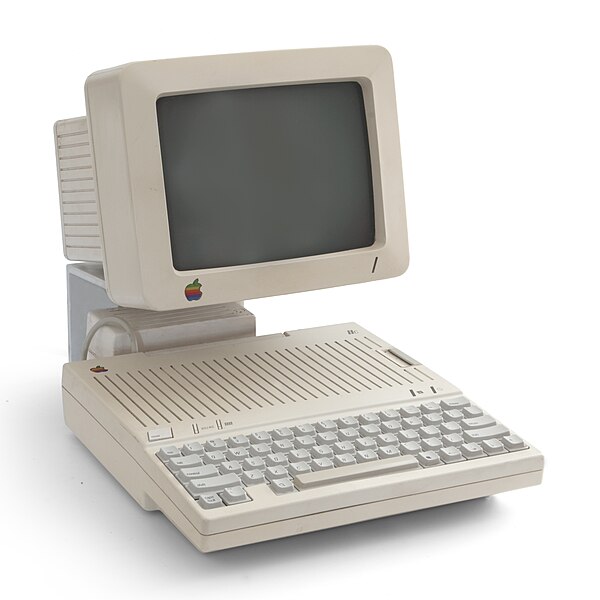
I was probably only about 13 years old and I remember when my dad purchased our first computer – an Apple IIc. The screen felt like it was about 6”, and I remember playing Lode Runner on it. We didn’t have internet, (I don’t even know if it existed for home use yet) and we used the computer mostly for games, and typing on.

Move ahead to internet use in the home – this took me quite awhile to jump on this
wagon, as the cost involved was not something that we could afford – and I
really didn’t understand the purpose of it. It was much easier to just pick up
the phone to talk to someone. Once I did make the decision to get hooked up,
internet was through our phone line (dial-up), so we could not be on the
internet and the phone at the same time. I remember when a phone company introduced a type of “call display” so that when I was on the computer, a message would pop up that someone
was trying to call me. Once again, it took quite awhile to make the move away
from dial-up, as the added cost was not something we were interested in. Once
the cost was comparable between the two, then we made the switch over.


It wasn’t until I started teaching-on-call that I made the
decision to “invest” in a cell phone. I remember it being a Motorola flip
phone, with the antennae I could pull out when a call came in. The
battery was twice the size of my current cell phone, and certainly did NOT fit
into any back pocket! My only purposes for my phone were for call-outs, and for
emergencies. I rarely gave out my phone number to anyone. Things really haven’t
changed for me much since then, but my phone style has at least changed! Over the
years I have progressed through different cell phones that have shrunk in size, and I currently have a basic
android cell phone. I continue to limit my use for emergencies and for
texting my daughters or close relatives, but I do have a couple games on it that I like to play, like Angry Birds! I do not use wireless/data access on
it, and really don’t have the desire to, when I use my computer for that.
As far as my personal technological devices, I self-proclaim
myself as “Old Fashioned.” When something new comes out, it takes me a long
time before I purchase it. Most times it is the cost involved, which is usually
higher when they first come out, so I tend to wait. The other reason is simply,
I don’t see the “need” for it when I have been getting by just fine without it.
When I do decide to purchase something, it is usually after it has been on the
market for some time, and I tend to use the same one for many years. My ipod is
one which I have had for a few years; my laptop is about 4 years old, and as
long as it works for me, I really have no desire to update. Keeping up to date
on the newest gadgets for my personal/family use just doesn’t interest me too
much, especially when there can be some big costs involved.

Technology really hasn’t been a big part of our lives, but
having teenage daughters started to change that. We didn’t want them to appear
“weird” to their friends, so we bought a few “gadgets” like a Wii -mind you
long after they came out - and bought them ipods to communicate via text with
their friends, but they could only do this from home connected to the wifi.
 |
When our oldest daughter entered highschool, we decided to
purchase a cell phone for her (same as mine), mainly for safety reasons, as she
rides the city bus to school. Of course, the freedom of texting came into the
picture, and she uses it quite often to text her friends. She cannot do much
more on her phone than text, although we know she would like to! She can use
her ipod to communicate as well, and uses that to send pictures, Facetime, and
play games on. I find myself often annoyed
by the amount of time she has her nose in her screen, and often put limits on
“screen time”. Our other younger daughter is now similar, but doesn’t have her
own phone yet, only the ipod that she can utilize from home. When I watch my
daughters and their friends, I have my concerns about this world in front of
screens, as I didn’t grow up this way. Talking endlessly on the phone as a
teenager was commonplace, and now that has been replaced by texting. When I am
in a public place, and everyone has their head down, not looking around and
taking-in the “real” world, I have to admit this saddens me. I almost find it
disheartening when kids will text each other when they are in the same room
instead of verbally engaging in conversation. I know, personally, we have set family rules in regards to this, but others have not, and sometimes I wish there was
more established etiquette to this! I often wonder, with the removal of verbal
cues and facial expressions what communication will be like in only 5 short years from now?
Will we lose our ability to effectively "talk" face to face with each
other?


 When it comes to reading
text - I still prefer print that I can hold in my hand, write all over,
and dog-ear a page if needed. I do not have an e-reader, and at this point, I am not really
concerned if I have one or not. Once again, I don’t have a personal “need” for
it, and I have been getting along fine without it. I realized that taking these
courses online was a huge adjustment for me when it came to reading. At the
beginning, I found that I was printing a lot of articles off to read them, but
eventually, I decided to forgo the cost of paper and ink, and I eventually got
used to reading off the screen. Despite changing the font size, I did have to
resort to getting glasses for the first time, as I found my eyes were
constantly straining!
When it comes to reading
text - I still prefer print that I can hold in my hand, write all over,
and dog-ear a page if needed. I do not have an e-reader, and at this point, I am not really
concerned if I have one or not. Once again, I don’t have a personal “need” for
it, and I have been getting along fine without it. I realized that taking these
courses online was a huge adjustment for me when it came to reading. At the
beginning, I found that I was printing a lot of articles off to read them, but
eventually, I decided to forgo the cost of paper and ink, and I eventually got
used to reading off the screen. Despite changing the font size, I did have to
resort to getting glasses for the first time, as I found my eyes were
constantly straining!
Despite my own attitudes toward owning a lot of
technological devices, I am recently learning the benefits they can have in the
educational system. I had the opportunity to TOC in a classroom that has a
Smartboard, and found it quite fun! I decided to take a workshop on
Smartboards, which I found very exciting, but I have not had the opportunity to
put this training into practice. My daughter’s Social Studies class last year
incorporated iPads, and her enthusiasm for this new way of learning positively
contributed to her educational experience. For her to be that excited about
Social Studies was certainly a feat! Sometimes I wonder though, with the
increase in students obtaining these devices, will the novelty of having them at school wear off?
Nonetheless, the learning opportunities that are available at our fingertips
continue to amaze me!

Sometimes it takes me awhile to get there, but eventually I do.
“Call Me Old Fashioned”
High Valley - "Call Me Old Fashioned"
Hamilton Place Studio Theatre - Hamilton, ON - March 2011
Images (in order of appearance):
Bilby. Apple IIc with monitor. 2010. Wikipedia. Web. 10 Jan. 2013.
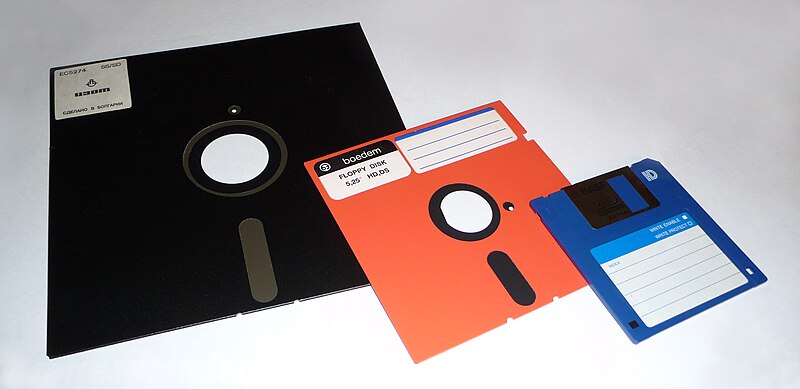
Chernilevsky, George. 8-inch, 5,25-inch, and 3,5-inch floppy disks. 2009. Wikimedia Commons. Web. 10 Jan. 2013.
Collins, Barry. old-pc. 2009. PC Pro. Web. 17 Jan 2013.
Screenshot ICQ 5.1. 2007. AllBestSoft.com. Web. 17 Jan 2013.
Screenshot ICQ 5.1. 2007. AllBestSoft.com. Web. 17 Jan 2013.
Motorola Flip Phone. 2012. Jam3s.net. Web. 12 Jan. 2013.
Squires, Fred. Rabbit Ears. 2009. Gunaxin Gadgets. Web. 15 Jan. 2013.
Motavalli, Jim. texting. 2010. Forbes. Web. 10 Jan. 2013.
Winchester, Henry. Dell Inspiron 1545. 2010. TechRadar. Web. 17 Jan. 2013.
Sauer, Niki. "Sauer Family Niagara Falls." 2010. JPEG.
Sauer, Niki. "New Glasses." 2012. JPEG.
Gatzke, Ludwig. Web 2.0 Logos. 2006. Flickr. Web. 17 Jan 2013.
Sauer, Niki. "New Glasses." 2012. JPEG.
Gatzke, Ludwig. Web 2.0 Logos. 2006. Flickr. Web. 17 Jan 2013.
Wednesday, 16 January 2013
"Coffee talk" transferred over!
A few people were probably following my posts as I was trying to upload a couple pictures in Vista using he HTML creator, but it just wouldn't work for me...so I decided to post it here.


Yes, this is me. My husband surprised me for my 40th birthday and arranged to have me thrown out of a plane!!
Amazing view of Kamloops BC. Our home is located just left of my chin! ha ha!
And here's our dog Pepper!

Monday, 14 January 2013
Reflections of Kist
 |
| Retrieved from: http://www.journalreview.com/news/article_0a94c57a-bca5-11e0-97f3-001cc4c002e0.html?mode=image&photo=0 |
The first page of William Kist’s book, The Socially
Networked Classroom, revealed to me the stark reality of children nowadays that
is not going to change anytime soon: “Picture afterschool at an elementary
school somewhere in the Midwest. The kids are racing for their book bags and
coats. As they make their way out of the building, a metamorphosis occurs as
they whip out cell phones, Blackberries, iPods, and even laptops. The kids are
getting back in touch with the world after hours of forced disconnect” (Kist,
2010, 1).
This is so true! Even as my daughters enter through the
front door of our home, the same thing occurs. I often jokingly complain to my
daughters that they need to “come back to the real world!” I guess in essence,
that is the real world to them. To me, when they prefer to text their friends,
as one who did not grow up with texting, I view it as an impersonal way of
communicating as compared to talking on the phone. Kist goes on to comment,
“one could make the argument that never before have we been more connected”
(Kist, 2010, p.1) I read this again on page 4. Yes, I agree that “kids are more
connected to other people on a second-by-second basis than they have been at
any other time in our history” (Kist, 2010, p.4) but I think there are many
forms of language/communication that are being left out. For instance, the
non-verbal communication, coverbal communication, Kinesics (Helmer & Eddy,
2012), these are all part of our verbal communication that are being missed
when students are communicating via text. I know I prefer my daughters to talk
on the phone, but they almost seem uncomfortable to do so! Facetime is at least
a bit better as far as I am concerned because at least they can see each
other’s faces, and hear tones in their voices.
Honestly, I don’t think I am against technology. I think it
has its benefits – if used properly. Taking a look at society nowadays, the use
of technology is necessary to function. So in order to prepare students for
this society, Kist made a good point that I think all educators need to take
heed: “We need to transform the way we do school because the digitalization of
information and automation of jobs has transformed the way we socialize and
work…What’s basic has changed” (Kist, 2010, ix). For some, however, including
myself at times, this change can be difficult. For teachers that have taught
the same way for years, it is tough to change. I think Kist has hit the nail on
the head when he describes the use, or non-use of technology in schools. The
increase of “scripted, standardized
curricula and assessments inside of school” (Kist, 2010, 5) and the
“uncertainty and limited familiarity with the possibilities (Kist, 2010, 6) are
contributing factors. Personally, if I don’t know how to use a piece of
technology, for example, a Smartboard, and it is going to take a lot of time to
learn it, then I will most likely stick what I am comfortable with. However, I
like the approach by Kist to profile
teachers who are “teaching new media lessons within the context of standardized
curricula and assessments”(Kist, 2010, 7) demonstrating that even well seasoned
teachers can accommodate the newer styles of teaching and learning. I am hoping
that by taking these courses, I will be more comfortable with newer
–technological - ways of teaching and learning.
Reading through many of the posts this week, a recurring
theme was online safety. A think this is
a main goal of many of us who would be considered digital immigrants: we are
“attempting to figure out ways to keep (their) students safe while at the same
time provide them with the experiences they will need to become fully
functional literate citizens in this century” (Kist, 2010, 7). Speaking from
personal experience on behalf of my daughter and her friends, who thought they
were being safe, they learned a hard lesson about safety. The warnings became
real, and now some are extra cautious, while others are more fearful. This can
be a real set-back, and discourage educators from wanting to pursue anything
that would bring that harsh part of the technological world into the classroom.
I like Kist’s statement at the end of his Foreword, which could sum up many
thoughts on this matter: “We hesitate to go forward, and yet, once there, we
would not go backward” (Kist, 2010, x).
Friday, 4 January 2013
Semester 2 begins...the adventure continues!
I am not much of a blogger, but throughout my courses since September, I have been forced to explore the world of Blogging! I have to admit, there is something appealing about being able to freely type out thoughts and process these thoughts. This new course, which will explore Web 2.0 and the way technology can be incorporated into learning is exciting, yet also a bit scary for me as I tread into new waters. I hope to gain new insights, and become comfortable with using these web-based tools, so in the future, when I am in a TL position, I will be able to share my knowledge with my colleagues and how they can have a bigger impact on student learning. So let the adventures continue...
Subscribe to:
Posts (Atom)